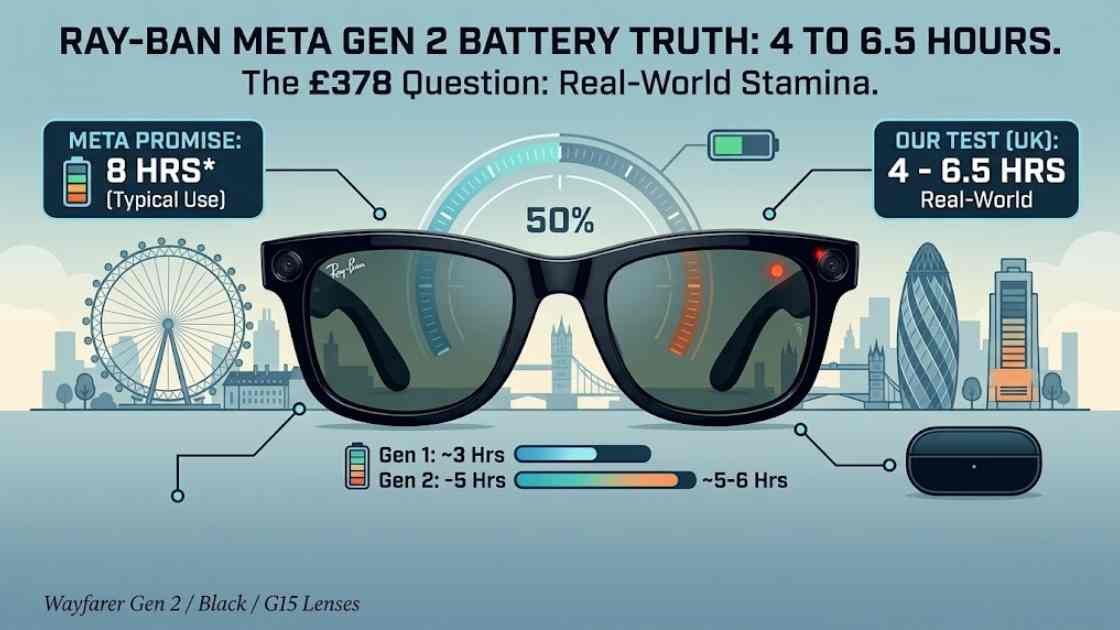
Ray-Ban Meta glasses battery life real world figures are the numbers Meta’s launch slides skate past, so I spent two weeks wearing a Gen 2 pair around London to pin them down. The short version: the official eight hour claim is achievable, but only on your gentlest days. Most of the time I landed somewhere between four and six and a half hours, and the difference came down to three settings most owners never touch.
I’m Daniyal Khan, and I review audio and smart home tech for GadgetsBuzz. As someone who has reviewed audio gear and built out a fully connected smart home, I care less about spec sheets and more about whether a gadget survives a normal day for UK readers. So this is the battery review I wanted to read before anyone spends £378.
What Meta promises on paper
Meta rates the Gen 2 glasses at up to eight hours of typical use, roughly double the four hours the original pair managed. The charging case carries another 48 hours of top-ups, and a 20 minute rest in the case takes the glasses back to 50 per cent. Those figures come straight from Meta’s official announcement, and in fairness, none of them are lies.
The catch is that phrase “typical use”. In plain English it means light, mixed activity: some music, a handful of photos, the odd voice command, and long stretches where the glasses simply sit on your face doing nothing. Idle time is where smart glasses claw their rating back, because the speakers, camera and microphones are all asleep.
Nobody buys camera glasses to leave them idle, though. Which is why the numbers below look rather different.
Ray-Ban Meta glasses battery life real world results: my two week test
I wore the Wayfarer Gen 2 (shiny black, G15 lenses) every day for a fortnight, from the walk to the shops to the Overground commute to a wedding in Birmingham on the middle Saturday. Each day I logged the percentage in the Meta AI app in the morning, at lunch, and whenever the glasses whispered their low battery warning at me. Three of those days tell the whole story.
The commute and podcast day
My standard weekday looked like this: 50 minutes of podcasts on the way in, a dozen photos, two short voice calls, then another 50 minutes of audio on the way home. That is around two and a half hours of actual speaker time at 60 per cent volume. The glasses came off charge at 7.40am and hit 22 per cent at 5.15pm.
Call it six to six and a half hours of wear with moderate use. Less than the headline eight, but more than I expected, and far better than the Gen 1 pair a friend lent me for comparison, which was begging for its case by lunchtime. If open-ear audio is your main use (the speakers sit above your ears rather than in them), they beat earbuds for comfort, though for pure stamina my £40 Tozo NC9 earbuds still last longer in their own little case.
The camera-heavy Saturday
The wedding was the stress test. Forty-odd 3K video clips, mostly 30 to 60 seconds each, maybe sixty photos, and a few “Hey Meta” queries about the running order. The glasses died just under four hours in, mid-afternoon, and one 15 minute stint of near continuous filming ate 11 per cent on its own.
Video is the battery’s real enemy. 3K simply means a resolution a step above standard 1080p full HD, and every extra pixel costs power. Android Police’s reviewer measured a single minute of 3K capture plus a two minute call knocking 8 per cent off, and my logs agree. Film an entire ceremony and you will not see teatime.
The Meta AI experiment
For two days I left the “Hey Meta” wake word switched on and used the assistant properly, asking for timers, directions, a translation, and the name of a suspicious looking plant in Victoria Park. Battery life settled at four and a half to five hours.
Here is the counterintuitive bit: volume barely matters. I ran one full day at 80 per cent volume and another at 50, and the gap was under half an hour. The microphones sitting awake listening for that wake word cost me more than the speakers ever did. Turn the wake word off and tap the arm to summon the assistant instead, and you claw back well over an hour.
One more quirk for UK readers: cold mornings. On a chilly 6am walk the percentage visibly dropped faster, and that is normal, because lithium cells hate the cold and there is precious little battery hiding inside these slim frames to begin with.
The charging case maths
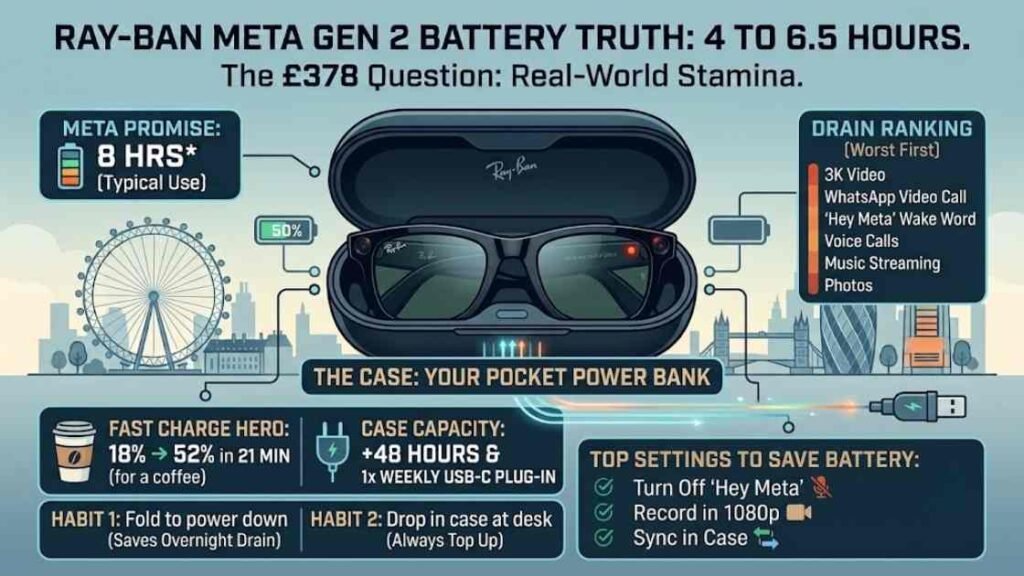
The case is the reason none of this ruined my fortnight. Meta says it stores 48 hours of charge. In practice that meant I topped the glasses up over lunch three or four times a week and plugged the case itself into USB-C roughly once a week.
Fast charging is the quiet hero of this product. My glasses went from 18 to 52 per cent in 21 minutes while I had a coffee, close enough to Meta’s 20 minute claim that I will not quibble. A lunch break effectively resets your afternoon.
Standby drain is gentler than expected too. I once left the glasses on a shelf overnight, unfolded and switched on, and they lost 9 per cent by morning; fold the arms and the loss all but stops, because folding powers them down.
Two habits make the maths work. First, fold the glasses whenever they are off your face. Second, drop them in the case whenever you are at a desk. Unlike a smartwatch or an Oura Ring 4, which you charge deliberately, these live in a battery bank disguised as a spectacle case. Owners who treat it that way almost never see a dead pair.
What drains the battery fastest, and the settings to change
After two weeks of logging, this is my drain ranking, worst first: 3K video recording, video calling through WhatsApp, the Meta AI wake word, voice calls, music streaming, and finally photos, which cost so little I stopped counting them.
Three settings changed my results more than anything else:
- Turn off “Hey Meta” wake word detection unless you genuinely use the assistant every hour. A tap on the arm does the same job for free and saves over an hour of wear time.
- Record everyday clips at 1080p in the Meta AI app rather than 3K. You keep the stabilisation, roughly halve the recording drain, and 3K is overkill for WhatsApp anyway.
- Let media sync while the glasses sit in the case. Transferring photos and clips to your phone over Wi-Fi is heavy work, and doing it from the case means the drain lands on the case rather than the frames.
However you set them up, expect a range rather than a fixed number. Heavy filming days sit near four hours, podcast commuting days nearer six and a half, and the promised eight appears only on days when the glasses are mostly ornamental.
Gen 1 vs Gen 2: is the battery alone worth upgrading?
The original Ray-Ban Meta glasses were rated at four hours and delivered nearer three once the novelty had you filming everything. Doubling that changes what the product is. Gen 1 was a party trick you rationed; Gen 2 is a gadget you can build a routine around, in the same way a week of battery makes smart rings like the Galaxy Ring 2 and Oura Ring 4 effortless to live with.
TechRadar’s hands-on reached a similar verdict, picking out the doubled battery and sharper video as the upgrades that matter. I found that the price gap makes the decision for you: if you own Gen 1 and mostly listen to audio, keep your money. If you film regularly, or the Gen 1 battery burned you, the difference is worth paying for. And if you spot Gen 1 discounted under £270, it remains a fair buy for light users who mainly want the camera for occasional snaps.
UK price and where to buy
The Wayfarer Gen 2 sells for £378 on Amazon UK at the time of writing (I checked on 8 July 2026), with the same frames from £379 direct from Ray-Ban and the Meta Store, rising towards £449 for Transitions and polarised lens options. Gen 1 stock still floats around the £270 mark.
Ray-Ban Meta Wayfarer Gen 2 (Shiny Black, G15) | Buy on Amazon | Around £378
Ray-Ban Meta Wayfarer Gen 1 (RW4006) | Buy on Amazon | Around £269.95
Weighing the same money against dedicated headphones is sensible, by the way. £378 buys a class-leading pair of noise cancelling cans outright, and our Sony WH-1000XM6 review makes that comparison sharper than Meta would probably like.
How this compares with other smart glasses
Context helps here, because eight rated hours is quietly near the top of the class for camera glasses. Oakley’s Meta HSTN frames, built on the same platform, stretch the rating slightly further with a sportier fit, while most audio-only glasses last longer simply because they have no camera or AI silicon to feed. Anything with a display, such as Meta’s dearer Display model, trades battery the other way.
Why do the makers never publish a simple battery capacity figure? Because the cells are split across both slim arms and are tiny, and a milliamp hour number would look embarrassing next to a phone. Hours of typical use is the kinder metric, which is exactly why real world testing like this matters more for smart glasses than for almost any other gadget we cover.
FAQ: Ray-Ban Meta battery questions, answered
How long do Ray-Ban Meta glasses really last on one charge?
Officially up to eight hours of typical use for Gen 2. In my testing, expect four hours with heavy camera use, four and a half to five with the Meta AI wake word on, and six to six and a half with music, calls and photos. Gen 1 manages roughly half of all those figures.
How do I check the battery percentage on Ray-Ban Meta glasses?
Open the Meta AI app and the percentage for both the glasses and the case sits on the home screen. You can also ask “Hey Meta, what’s my battery level” if the wake word is on, and the LED inside the case shows its own charge status.
Does the charging case add battery on the go?
Yes. The case stores roughly 48 hours of extra charge and refills the glasses to 50 per cent in about 20 minutes. It charges over USB-C, and one weekly plug-in covered my entire fortnight of testing.
Can I make Gen 1 Ray-Ban Meta glasses last longer?
The same tricks apply: switch off the “Hey Meta” wake word, record at 1080p rather than the maximum resolution, fold the arms to power the glasses down, and let media sync to your phone happen while they sit in the case.
Do Ray-Ban Meta glasses drain while switched off in the case?
Not meaningfully. The case tops the glasses up to full and holds them there, so a pair left cased overnight comes out at 100 per cent. The case itself slowly spends its 48 hour reserve doing so.
The takeaway
Treat the Gen 2 pair as a five to six hour gadget with a brilliant pocket recharger rather than an all-day wearable, change the three settings above on day one, and the battery will almost never be the thing that lets you down.
Daniyal Khan reviews audio and smart home tech in a real London flat for GadgetsBuzz. This article contains affiliate links. We only recommend products we genuinely rate.